Recipes and reading, kept properly
You save things you never go back to.
A screenshot of a recipe cannot be searched by ingredient, and a saved link is indistinguishable from forty other saved links. Curate reads what you send it and gives it back as something you can actually use.
Or see every way to get it. Your library is the same everywhere you sign in.
-
The long ferment
a tab you left open
essays
-
Miso-Glazed Aubergine
a link someone sent you
dinnervegan
-
Sourdough, the short way
a screenshot, from March
baking
-
The Attention Merchants, revisited
a bookmark from 2023
to read
-
A Field Guide to Slow Bread
a note to yourself
baking
The long ferment
Nothing about it is quick, and that is the whole argument. The work is not in the hour you spend on it; it is in the hours you are not there for.
A spoonful of miso does what an hour of stock does, and the difference is only ever time.
The same is true of the things we mean to read. They do not go stale on a shelf. They go stale in a browser tab.
In the ingredients
Miso-Glazed Aubergine
3 tbsp white miso
In a highlight you made
The long ferment
a spoonful of miso does what an hour of stock does
In the text
Salt, Fat, Acid, Heat – the glossary
fermented pastes – miso, doenjang, gochujang
It is not that you did not save it. It is a tab, a screenshot, a link someone sent you, a bookmark from 2023 – five places, and none of them the place you look.
Curate reads each one and gives it back as something. One library, where a recipe knows its timings, a long read knows how long it takes, and everything takes tags.
Then it is worth opening. The page without the pop-ups, at your size – and the line worth keeping, kept.
And findable by what is in it. An ingredient, a line you highlighted, a word buried in something you had forgotten you saved.
Saving was never the hard part.
The content is captured but not usable. It ends up scattered across screenshots, browser tabs, notes apps and message threads, and every one of them is a place you have to remember to look.
One place
Capture takes five seconds
Curate lives in your share sheet. Hit Share, pick Curate, carry on with what you were doing. It finishes in the background and tells you when it is ready.
No filing
Nothing to sort afterwards
Tags are suggested for you and cost nothing. There are no folders and no collections, because manual filing is the behaviour Curate exists to make unnecessary.
Yours
Saved is saved
A saved item keeps its own copy of what it said, so it stays readable when the page behind it changes, moves or disappears.
Recipes
Every ingredient searchable. No ads, no preamble.
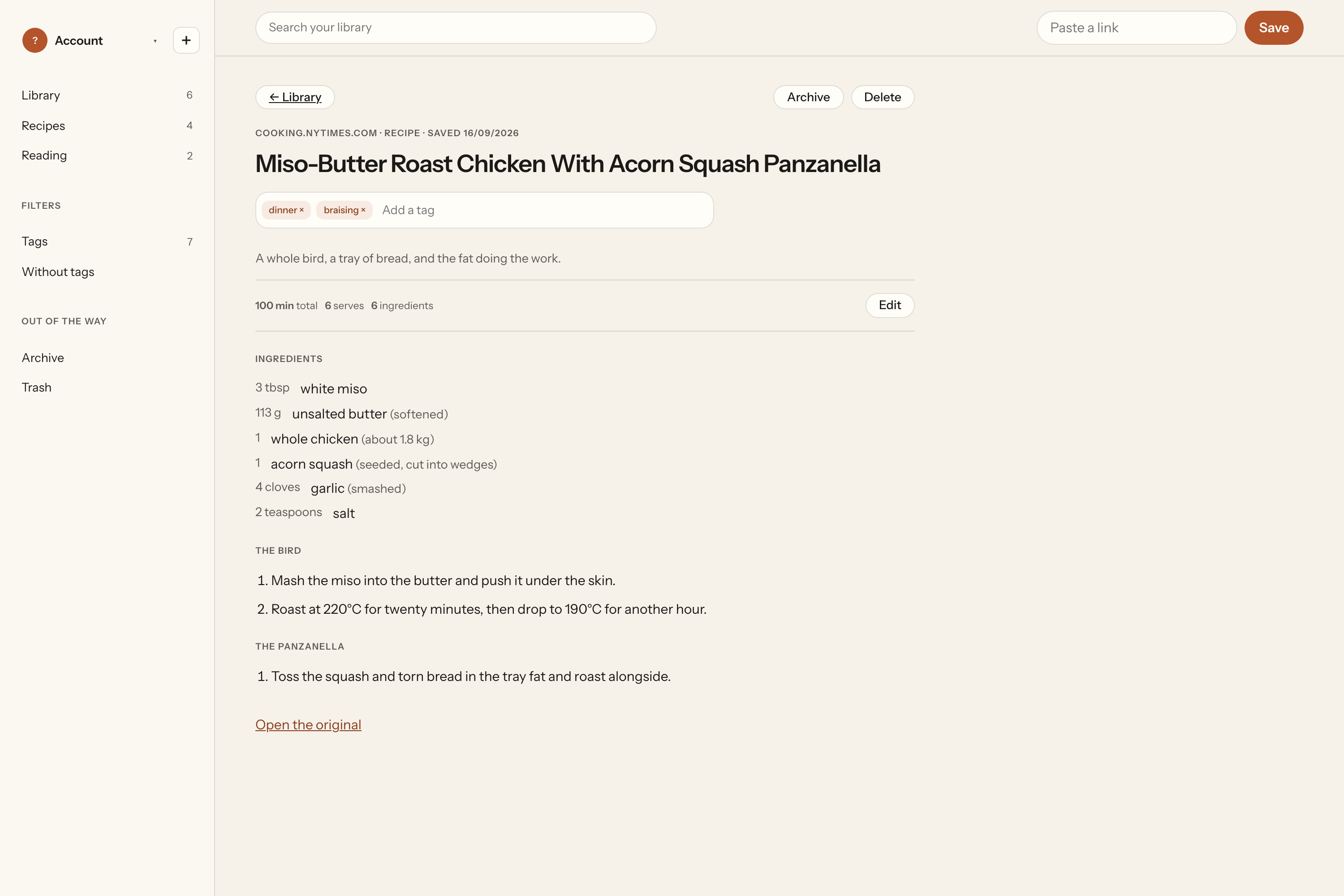
Send a page, a screenshot or a photo of a cookbook. What comes back is a title, a time, a number of servings, ingredients as real quantities, and a numbered method. Nothing else.
Quantity, unit and item are three separate fields, which is what makes what have I got with miso a question the app can answer. When something comes out wrong you tap the part that is wrong and change just that part.
Search
Find things by what they contain.
Not by where you filed them, because you did not file them. Curate looks in titles, text, ingredients, tags and your own highlights, and every result tells you why it matched.
Archived items stay searchable. They just do not sit in the feed.
Five ways in, and one of them is already on your phone.
Paste a link
A recipe, an article, anything.
Paste text
From a message or an email.
Photos
One page or several.
Camera
A cookbook page in front of you.
A document
PDF, Word or plain text – one item, like everything else.
Privacy and data
We don't train anything on your content.
Not your recipes, not your articles, not your highlights. Everything is stored and processed in the EU, and our inference providers are held to zero retention.
Analytics tells us which screens you open
Which screens, whether a save worked or failed, and crash reports. Never titles, links or page text, never ingredients or anything you cook, and never what you search for. We ask before any of it is collected, and saying no breaks nothing.
Export whenever you like
Your whole library, on both plans, free. Nothing you have saved is ever behind a subscription.
The whole of it is in the privacy policy.
Pricing
Reading, searching and keeping are free. Forever.
The only thing we meter is how many things we read for you: twenty a month on the free plan, no limit on the paid one. If you stop paying, everything you have saved stays readable and searchable.
Questions worth asking first.
What happens to my library if I stop paying?
Nothing. Lapsing changes what you can newly process, never what you can reach. Every item you have saved stays readable, searchable and exportable.
What counts against the twenty?
One save is one save, whether it is a tweet-length recipe or a 40-page PDF. Capturing, storing, reading, searching, tagging, highlighting and exporting are never metered.
What if the extraction gets something wrong?
You fix it, and it takes seconds. Every field the app generated can be edited, and when we are genuinely unsure we ask rather than guess: a curled page that cut off a quantity shows you the crop of the photo and the options.
Does it work offline?
Saving does. Anything captured while you are offline waits and goes through the moment you are back. Signing in is the only thing Curate cannot do offline.
Is my library on all my devices?
Yes. One account, one library, on iPhone, Android, the browser extension and the web app. Sync serves you across your own devices; Curate is a single-user product and there is no sharing or collaboration.
What can I save?
Recipes and reading articles, from a link, pasted text, photos, the camera or a document. Two content types and no others, on purpose: both get a proper screen instead of everything getting a generic one.
Start with the next thing worth keeping.
Twenty processed saves a month, free, no card. Reading and searching are never limited.